The kids range of Lexibook 7-Inch Tablets have some seriously bad reviews. For the price it really should fare better. Specially when you consider what else you can buy for around the same price of £40 - £50. And when you also take into account that for the same price of a Lexibook 7 Inch you can get a Quad Core Tablet that is fast and stable, with good memory and battery life, and also comes complete with kids software pre-installed.
So why bother with a Lexibook when they are riddled with problems. A lot of people still buy them despite negative reviews.
But if you want to avoid a potential headache, don't waste your money on one. Some major problems that people report are that the device only allows the user to charge the Tablet up one time, then after that it just won't allow the user to charge it again.
So it basically has the chance of not even lasting you the day before it can't be charged any more. Another issue is the battery life itself is very bad. In fact, most people say the product just plain doesn't work properly. Someone asked a question about one of the Tablets on Amazon, and a user who has bought and owned the product said. Can't help you, "Mine does not even turn on".
One of two things is going on with Lexibook Tablets. Their products are either suffering from severe quality control issues, or they are trying to make as much money as possible and have got the manufacturers in China to use the cheapest parts and components possible in order to get their unit price down as low as possible.
They then market that low quality product as a "First Tablet for Kids", throw some kid's decoration on the surface like bright colours, happy kids on the screen in the pictures of the product, bit of software for the kids to use, and there you go. You now have a cheaply made, poor quality product marketed for kids that won't last very long because it has been made using the cheapest parts possible.
And it's OK, because it's just a kids Tablet anyway. That's what it looks like they want you to think. Give it a pass so to speak. Well it does matter, and it doesn't get a pass. Kid or adult, who wants to buy and use a product that is riddled with problems and only has a short lifespan. Nobody. Who cares how user-friendly a product is marketed as being if it doesn't even work.
Products like this should be taken off sale on Amazon and only allowed to return if they are revised and made to a better standard. Much better options are out there, some are even cheaper than most of the Lexibook 7 Inch models. Two that are much better quality kids Tablet are the KAPOW 7 Inch (£37) and the EUHubb 7 Inch (£34). Both are excellent for the price, cheaper than the Lexibook models, and the reviews speak for themselves. - Tabtron.

Apple iPad AIR Retina Tablet Review
Computer Tablets don’t come much better than an Apple iPad Air. The quality and feel of this product is second to none. This is not the latest Apple iPad to hit the shelves but it does remain one of the most popular. The Apple iPad Air 2 is available to buy but is sightly more expensive (Around £60 extra). For the higher price tag attached to the iPad Air 2 you get an iPad that weighs less, and is smaller than the previous model. It also has a longer battery life, a faster processor (A8X), better rear camera, and a few other little upgrades. But unless you’re an Apple nut, do you really need to shell out the extra cash.
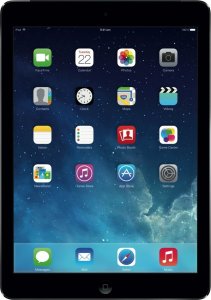
I mean, how fast does your tablet really need to be. The Apple iPad Air is a seriously fast Tablet already and any upgrade is basically going the extra mile and wanting the absolute latest and greatest iPad out there. Is it needed? Probably not. Got money to spend and want the best Tablet on the market – Go for it. Both are well worth the money. If you want a good Tablet but don't want to spend iPad money take a look at the Fusion5 and Neocore tablets [updated model]. They are good choices when it comes to buying a cheap functional Tablet.
Back to the Original iPad Air Tablet. The cheapest Price for the 16GB version is that found on Amazon UK. And it’s a real bargain for the price. Customer reviews are superb. If your reading this post I’m sure you are well aware of what the iPad Air is capable of so I doubt I need to explain every feature in great detail. Here is a quick low down of some of the features in case you haven’t already done your homework.
Features + Specification
The Apple iPad Air is an extremely easy to use Tablet device. It’s got a very fast processor chip, we're talking A7 technology here! One of the best there is. It’s called “Air” because it’s so light in weight. The “Retina” in the name is due to the screen resolution and graphics being extra sharp and colourful. Beautiful to look at. So what can you do with an iPad Air?
Well, just about anything. Internet, watch television, movies, take pictures, record video, read books, listen to music, play games, and also edit and create documents with Microsoft Office as it comes with the package included. So you get Word, Excel, Powerpoint etc with the iPad. You also get a boat load of other software included for free with the iPad. Not to mention Apps galore from the apple web store. I think the question is what can’t you do with it. Not much.
Limitations
In saying that, there are a few limitations that you should be made aware of. Like not being able to upgrade the storage capacity. So if you buy the 16GB version that is what you have got unless you upgrade the whole iPad to one with a bigger storage capacity (hard drive). You may be able to get it upgraded by Apple but the price of this would be high. 16GB, 32GB, 64GB, and 128GB iPad Air Tablets are available.
Internal Storage Space
Depending on what you plan to do with your iPad will determine which you size should buy. If you want it to store big files on like lots of music, pictures and documents then maybe the 64GB or 128GB would be more appropriate. But if you want to use your iPad Air to do all the general tasks, other than use it to store lots of files, then 16GB model should be plenty for most people.
Other limitations include no SD card slot, although a lead can be bought to get past this small hindrance. Also, there is no USB slot. Everything has to be “In House” so to speak. The App store controls the roost. Printing also has its difficulties as you need to have a printer that has WiFi capabilities in order to print anything from the iPad Air. If you write a lot and plan on doing a lot of typing work on your iPad Air, an External Keyboard might be a good option for you. These are relatively cheap to buy depending on what quality level of keyboard you go for.
Conclusion
All in all the iPad air is not without its little faults and limitations, but in comparison to how good the iPad Air actually is, and how much it is capable of doing, they are relatively minor issues that can mostly be worked around. If you can’t live with the niggles get yourself a decent laptop instead. There are lots available that have excellent specs and customer reviews that fall within the same price range. However, for the price I think most people will choose the iPad Air. Want something smaller, or in fact, miniature. Check out the Apple iPad 4 Mini.
Subscribe to:
Posts (Atom)
